Depth Settings
The Depth Settings section controls how the material is rendered by the depth. These settings are more technical, and most users can leave them at their defaults unless making a special effect if you know enough.
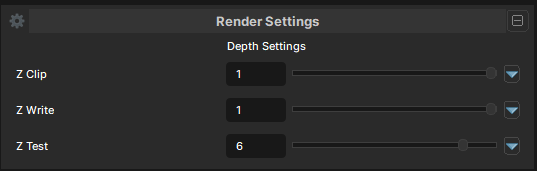
ZClip
- UI Type : Toggle
Controls whether geometry outside the clipping range is clipped normally.
When enabled, geometry outside the valid clipping range is removed as expected. When disabled, clipping is disabled for the material. This is mostly useful for special rendering tricks or unusual effects.
ZWrite
- UI Type : Toggle
Controls whether the material writes to the depth buffer.
When enabled, the material writes depth normally and can correctly occlude objects behind it. When disabled, the material does not write to depth. This is commonly used for transparent materials or other effects that should not block what is behind them.
ZTest
- UI Type : Slider
Int- Range :
0 - 7
- Range :
Controls how the material compares against the current depth buffer.
s&box uses Reverse-Z, so the default value is 6 which is GREATER_EQUAL.
This is the correct default for normal rendering in s&box. Unlike traditional depth pipelines, LESS_EQUAL is not the default here.
Here is the order mapping of the available options
| Number | Mode | Information |
|---|---|---|
| 0 | Never | The fragment never passes the depth test. |
| 1 | Less | Passes only when the new depth is less than the stored depth. |
| 2 | Equal | Passes only when the depths are exactly equal. |
| 3 | Less Equal | Passes when the new depth is less than or equal to the stored depth. |
| 4 | Greater | Passes only when the new depth is greater than the stored depth. |
| 5 | Not Equal | Passes when the depths are different. |
| 6 | Greater Equal | Default in s&box Reverse-Z. Recommended for normal materials. |
| 7 | Always | Always passes depth testing. Mostly useful for special effects or debugging. |