Main Color
The Main Color section is for the main fundamentals of a material. This section controls the Main color of the material and its UV settings. This is the main section you'll want to use first to set up your material with the shader.
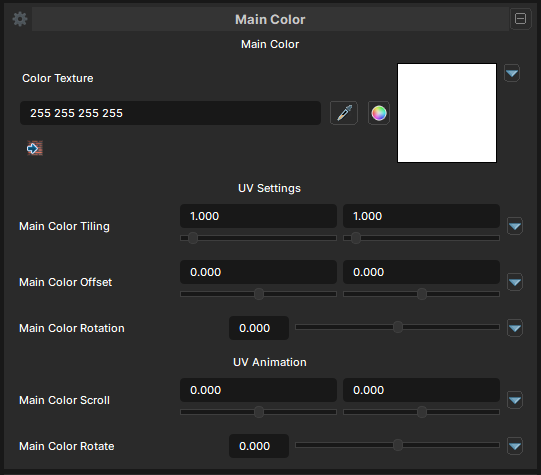
Main Color Texture
- UI Type :
 Color Texture
- Output format :
BC7 [RGBA]
- Output format :
Main Color Texture is the main texture of the material. It's used as basecolor. If image texture isn't available to use, Color can be used by clicking at the Color Ball icon button.
UV Settings
Main Color Tiling
- UI Type : Slider
Float- Range :
0.010 - 20.0
- Range :
Main Color Tiling controls how many times main color texture repeats across a 3D model's surface. The first value is X and second value is Y.
A value of less than 1.0 will narrow down the main color texture while more than 1.0 will create more tiles of the same main color.
Main Color Offset
- UI Type : Slider
Float- Range :
-1.0 - 1.0
- Range :
Main Color Offset shifts the placement of the main color texture across a 3D model’s surface. The first value is X and second value is Y.
A value of less than 0.0 or more will shift the texture to down or up. A value of -1.0 and 1.0 produces the same result as 0.0.
Main Color Rotation
- UI Type : Slider
Float- Range :
-180.0 - 180.0
- Range :
Main Color Rotation rotates the placement of the main color texture across a 3D model’s surface. A value of -180 and 180 produces the same result.
UV Animation
Main Color Scroll
- UI Type : Slider
Float- Range :
-5.0 - 5.0
- Range :
Main Color scroll moves the placement of the main color texture, creating the illusion of movement without moving the object itself. The first value is X and second value is Y.
A value of less than 0.0 or more will scroll the texture left-right or up-down depending on the axis you used. More than 1.0 will speed up the scroll animation.
Main Color Rotate
- UI Type : Slider
Float- Range :
-1.0 - 1.0
- Range :
Main Color Rotate rotates the placement of the main color texture. A value less than 0.0 or more will start rotating the texture to left or right. More than 1.0 will speed up the rotate animation.