Backface
The Backface section is for controlling the culling and customizing the backface of the model. 3D models have two sides. Frontfaces and Backfaces. By default, both sides are rendered. You can change which side you want to render in the General Settings.
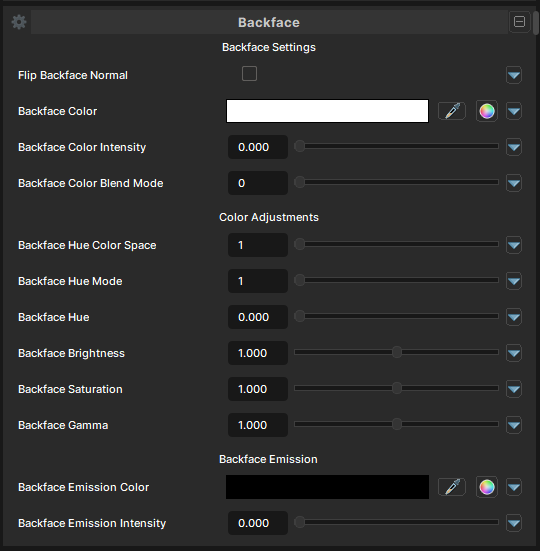
Main settings
Flip Backface Normal
- UI Type : Toggle
Flips the backfaces' normals. Can be used when backfaces are inverted to correct it.
Backface Color
- UI Type : Color
Tints the backface's color by multiplying with base color by default.
Backface Color Intensity.
- UI Type : Slider
Float- Range :
0.0 - 1.0
- Range :
Controls the intensity of Backface Color.
Backface Color Blend Mode
- UI Type : Slider
Int- Range :
0 - 7
- Range :
Controls the blending mode of backface color tint. See Blend Modes. Color Adjustments are also available to use.
Backface Color adjustments
Backface Hue Color Space
- UI Type : Slider
Int- Range :
1 - 2
- Range :
Selects a color space mode for color adjusting. OKLab is set by default.
| Number | Mode | Information |
|---|---|---|
| 1 | OKLab | OKLab is a modern color space designed to behave more like human vision. Color adjustments in OKLab appear smoother, more natural, more visually balanced. |
| 2 | HSV | HSV is simple and fast. HSV can sometimes oversaturate colors, shift brightness unexpectedly or create unnatural gradients. |
Backface Hue Mode
- UI Type : Slider
Int- Range :
1 - 2
- Range :
| Number | Mode | Information |
|---|---|---|
| 1 | Shift | Tints the Backface based on the existing color by blending correctly. |
| 2 | Replace | Directly applies the hue into Backface as an override. |
Backface Hue
- UI Type : Slider
Float- Range :
0.0 - 1.0
- Range :
Shift the Backface Color around on the hue circle. As the value is circular, it'll give you the same effect at 0 and 1.
Backface Hue Speed
- UI Type : Slider
Float- Range :
0.0 - 5.0
- Range :
Shift the Backface Color around on the hue circle by its own. It can be used for all-time color changing effects.
A value of 1.0 will shift the full hue circle in 20 Seconds.
Backface Brightness
- UI Type : Slider
Float- Range :
0.0 - 2.0
- Range :
Controls the brightness of the Backface.
Backface Saturation
- UI Type : Slider
Float- Range :
0.0 - 2.0
- Range :
Controls the saturation of the Backface.
A value of 0 makes the color fully desaturated while 2 makes the color more saturated.
Backface Gamma
- UI Type : Slider
Float- Range :
0.0 - 2.0
- Range :
Controls the brightness of Backface's mid-tone colors without significantly affecting pure black or pure white areas. Lower values are more lighter and higher values are more bolder.
Backface Emission
Backface Emission Color
- UI Type : Color
Controls the Emission color of the backface. This won't work unless Backface Emission Intensity is used.
Backface Emission Intensity
- UI Type : Slider
Float- Range :
0.0 - 5.0
- Range :
Controls the Emission Intensity of the backface.
A value of 1 can be enough to make the color glow. More than 1 can make the emission make more glow and give Bloom effect if Bloom post-processing is used.